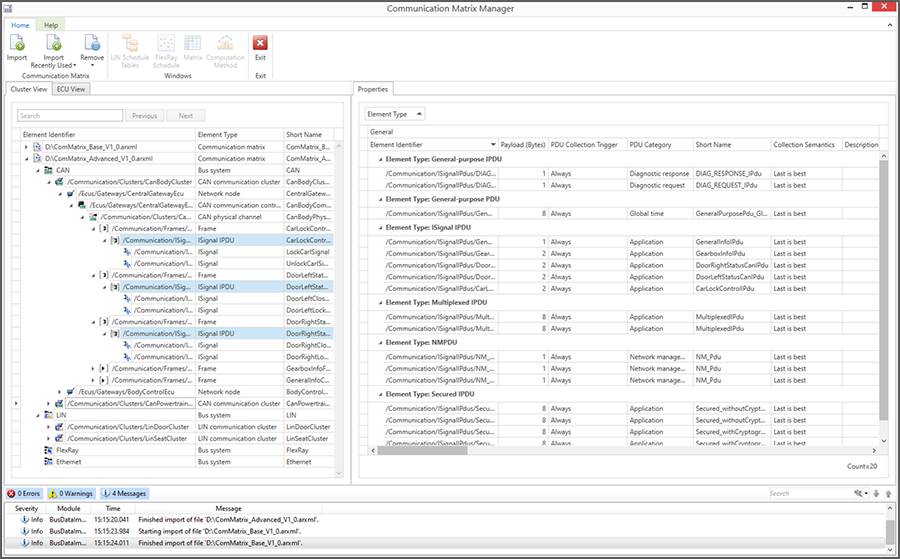
The dSPACE Communication Matrix Manager provides engineers with a clear, structured view of modeled bus communication and enables efficient verification and analysis of communication matrices.

Built-In Quality Checks

Automatically validate syntax and semantics to catch issues early - saving time and ensuring your communication data is ready for the next development phase.

Seamless AUTOSAR Integration

Full support for AUTOSAR Classic and Adaptive platforms enables smooth handling of ARXML files and ensures compatibility with standardized automotive development workflows.

Communication Matrix Comparison Made Easy

Quickly compare different communication matrix versions to identify changes, track revisions, and maintain consistency across development cycles.

Multi-Format Visualization

Import and explore communication matrices in various formats with intuitive visualizations that simplify complex network structures.

Any questions? Our Technical Staff will help you!

What are Communication Matrices and how are they used?

In modern automotive systems, communication matrices are essential for defining and managing the exchange of data between electronic control units (ECUs) across various in-vehicle networks such as CAN, LIN, FlexRay, and Ethernet. These matrices describe the structure and semantics of messages and signals, including their timing, data types, scaling, and transmission properties. They serve as a central source of truth for network communication, ensuring that all ECUs interpret and process data consistently. Communication matrices are typically maintained in standardized formats like DBC (for CAN), LDF (for LIN), or AUTOSAR XML (for various bus systems), and are critical for tasks such as network design, ECU software development, testing, and diagnostics. As vehicles become more complex and software-defined, the ability to manage and validate these matrices efficiently becomes a cornerstone of successful automotive development.

What is the Communication Matrix Manager?

As a leader in automotive development solutions, dSPACE offers powerful tools for managing and validating communication matrices with precision and efficiency. The dSPACE Communication Matrix Manager empowers engineers to handle complex network configurations, streamline development workflows, and ensure compliance with industry standards—making it an essential component for robust and future-ready vehicle communication systems.

Industries and Applications
  • Automotive 
  • On-& Off-Road Commercial Vehicles
  • Aerospace
  • Industrial Automation
  • Energy
  • Agriculture

Key Benefits of the Communication Matrix Manager

The dSPACE Communication Matrix Manager is a powerful solution designed to streamline the handling of communication matrices throughout the development process. Built with deep expertise in automotive networking, it offers a comprehensive set of features that simplify and enhance communication matrix management. It is designed to address the real-world challenges engineers face when working with complex automotive communication matrices. From unreadable XML files to inconsistent data across development stages, this tool simplifies and streamlines the entire workflow—saving time, reducing errors, and improving collaboration.
 

1. Multi-Format visualization

Navigating raw communication matrix files - especially in formats like ARXML or FIBEX - can be tedious and error-prone. The Communication Matrix Manager eliminates the need for manual inspection by providing a format-independent, graphical representation of your communication data. Engineers can import matrices in ARXML or FIBEX, which support multiple protocols; DBC, for CAN-based communication; LDF, for LIN-based communication; as well as IDL and RTI XML files, which are used in DDS-based communication systems. Instantly access a structured, hierarchical view of clusters, channels, ECUs, PDUs, and signals. Filters and dedicated views make it easy to focus on relevant elements, understand relationships, and explore properties—all without writing a single line of code or the need to dig through unreadable files. This dramatically improves productivity and reduces onboarding time for new team members.

2. Built-In Quality Checks

Ensuring the integrity of communication matrices is critical for reliable ECU interaction and system behavior. The Communication Matrix Manager acts as a quality gate by automatically checking the syntax and semantics of imported matrices. These checks can be seamlessly integrated into a continuous integration (CI) pipeline, allowing teams to automate validation and catch issues early. This helps detect missing definitions, invalid configurations, and inconsistencies early in the development process—before they propagate into software or hardware integration. By catching errors upfront, teams can avoid costly debugging and ensure a smoother transition to subsequent development phases.

3. Communication Matrix Comparison Made Easy

Tracking changes between matrix versions is essential in agile development environments, where updates are frequent and collaboration spans multiple teams with evolving network architectures. The Communication Matrix Manager enables intuitive, side-by-side comparisons of communication matrices across all supported formats. Engineers can compare payload lengths, header IDs, signal definitions, and more. Its intuitive interface and automated checks allow users to pinpoint changes and validate configurations quickly, reducing debugging time and improving overall system reliability. Results are presented in both HTML and XML formats—making them easy to review in a browser or integrate into CI pipelines and third-party tools. This feature improves transparency, supports version control, and facilitates efficient communication between departments.

4. Seamless AUTOSAR Integration

AUTOSAR ARXML files are essential for implementing advanced features like cybersecurity, diagnostics, and end-to-end protection—but they are notoriously difficult to read and interpret manually. The Communication Matrix Manager offers full support for AUTOSAR Classic and Adaptive platforms, allowing users to import, visualize, and validate ARXML files with ease. This ensures compliance with industry standards and enables seamless integration into model-based development and testing workflows—making it an indispensable tool for teams working on future-ready automotive systems.

Functionality Overview

Functionality
Description
General
  • Import communication description files: DBC, LDF, FIBEX, ARXML, IDL, RTI XML
  • Load multiple communication matrices simultaneously
  • Support for AUTOSAR system templates and ECU extracts
  • Compare two communication matrices directly via context menu
  • Integration with other dSPACE tools for seamless workflows
  • Generate HTML and XML reports for documentation and automation
Representation
  • Graphical, format-independent visualization of matrix content
  • Multiple views for element properties, sender-receiver relations, and scheduling
  • Visualize ARXML, DBC, LDF, XML, IDL, and RTI XML files
  • Display computation methods in diagram form
  • Dedicated views for visualising J1939-based communication
  • Gateway support with dedicated views for Signal and PDU Gateways
Handling
  • Perform consistency checks with automatic log file creation
  • Use search and filter functions for quick navigation
  • Export comparison results as HTML or XML files

Do you need help purchasing our Software?:

Support

  • Communication Matrix Manager Download
    Communication Matrix Manager Download

    The Communication Matrix Manager lets you handle communication matrices independently of their file format, e.g., to analyze and/or compare the content of the matrices.

Contact Information

  • Contact
    Contact

    You can find all the information on contacting dSPACE here

  • Getting Started with Installation and Licensing
    Getting Started with Installation and Licensing

    First steps with dSPACE software - purchase, installation, and licensing.

Stay up-to-date with our dSPACE direct newsletter service.

With our dSPACE newsletter service, we will keep you informed about current use cases and new solutions and products, as well as trainings and events. Sign up here for a free subscription.

Enable form call

At this point, an input form from Click Dimensions is integrated. This enables us to process your newsletter subscription. The form is currently hidden due to your privacy settings for our website.

External input form

By activating the input form, you consent to personal data being transmitted to Click Dimensions within the EU, in the USA, Canada or Australia. More on this in our privacy policy.