
Platform Management is not functional when using PROXY Environment Variables
Problem description
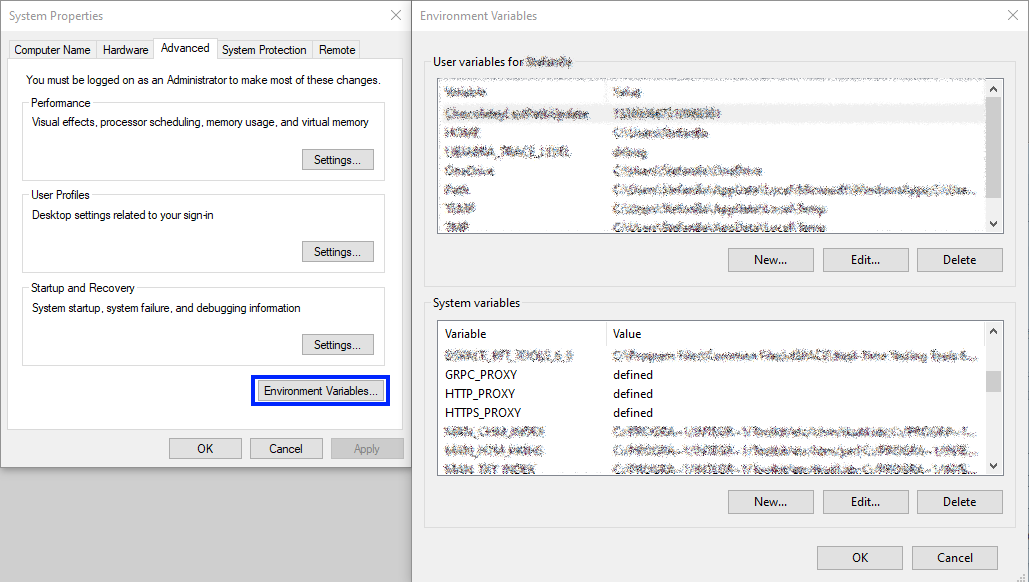
When using the following Environment Variables together with dSPACE Release 2022-A and 2022-B, the Platform Management is not functional:
- GRPC_PROXY
- HTTPS_PROXY
- HTTP_PROXY
If at least one of the PROXY Environment Variables described above is defined, your system might be affected.
Affected dSPACE tools
All tools using the dSPACE Platform Management from dSPACE Release 2022-A and 2022-B are affected.
The dSPACE Platform Management is a Common Component for several dSPACE Products. It is installed with the product from the newest dSPACE Release that uses the Platform Management.
The following dSPACE products are using the Platform Management:
- ControlDesk
- ConfigurationDesk
- AutomationDesk
- ModelDesk
- MotionDesk
- XILApiMAPort
- PlatformManagementAPI
- CmdLoader
- Real-Time Test Manager
- Firmware Manager
- VEOS
Solution
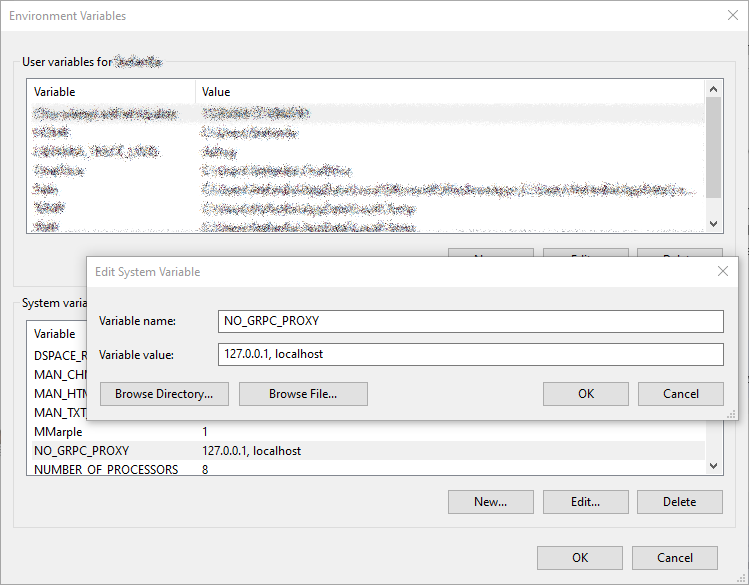
Set the Environment Variable NO_GRPC_PROXY to 127.0.0.1, localhost.
If there is no NO_GRPC_PROXY Environment Variable, create that Environment Variable first.
| Date | 2023-08-02 |
| Product | AutomationDesk, ConfigurationDesk, ControlDesk, Firmware Manager, ModelDesk, MotionDesk, Platform API Package, RTI (Real-Time Interface), Real-Time Testing, SCALEXIO, VEOS |
| Information Type | Known Problem Reports |
| Information Category | Troubleshooting |
| dSPACE Release | 2023-A, 2022-B, 2022-A |
Drive innovation forward. Always on the pulse of technology development.
Subscribe to our expert knowledge. Learn from our successful project examples. Keep up to date on simulation and validation. Subscribe to/manage dSPACE direct and aerospace & defense now.