
Model Compare
Vergleichen von MathWorks® Simulink®-, Stateflow®- und dSPACE TargetLink-Modellen
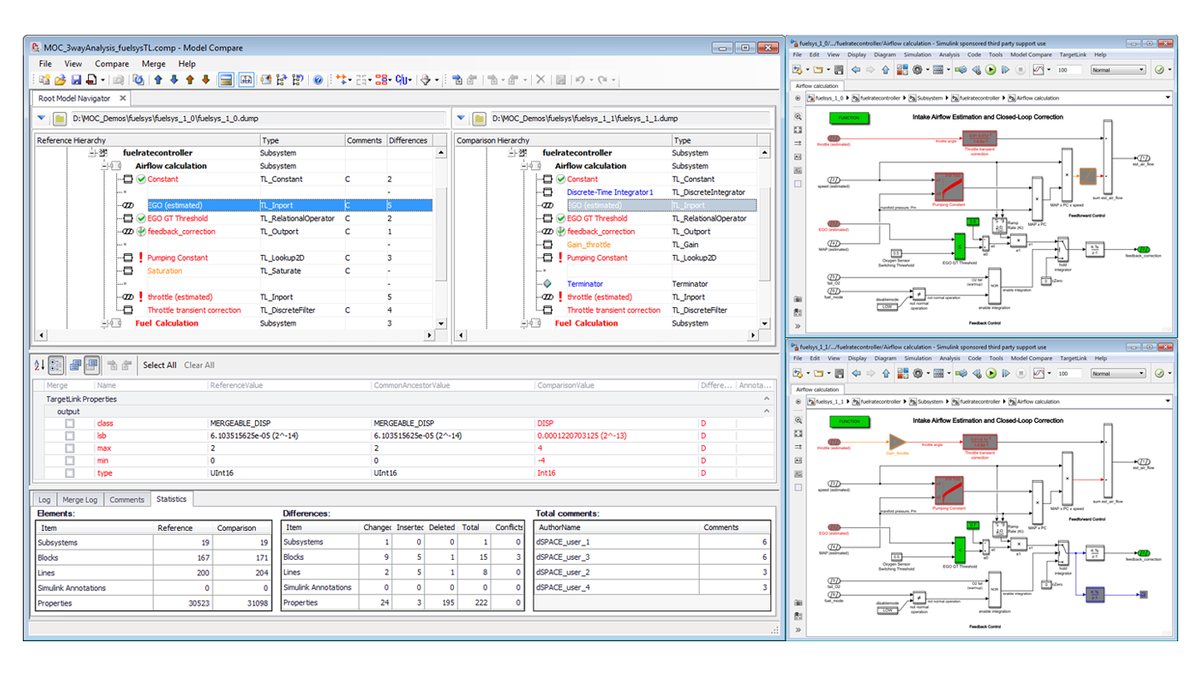
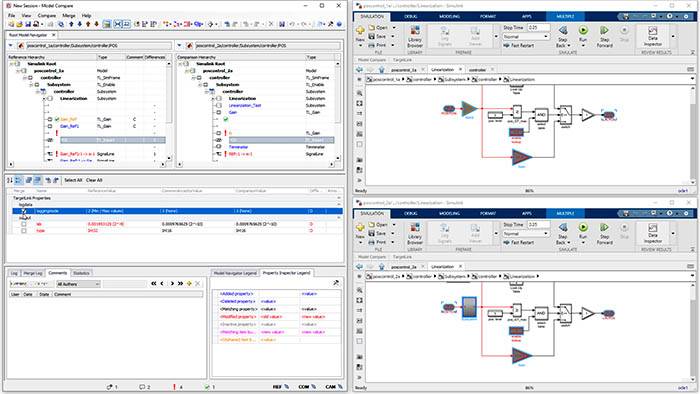
Model Compare findet alle Änderungen an einem Modell. Auch große Modelle lassen sich innerhalb von Minuten vergleichen, was ohne Werkzeugunterstützung praktisch unmöglich wäre.
- Intelligenter und einstellbarer Vergleichsalgorithmus mit Merge-Funktion
- Flexible Differenzfilterkonfiguration und hochkonfigurierbare Differenzberichterstellung
- Drei-Wege-Analyse mit Konflikterkennung und automatischen Auflösungsoptionen
Anwendungsbereiche
Der automatisierte Vergleich ist bei der Arbeit mit mehreren Modellversionen unabdingbar. Model Compare von dSPACE kann mit jedem TargetLink-, MathWorks® Simulink- oder Stateflow-Modell eingesetzt werden und unterstützt auch Bibliotheken. Zum breiten Anwendungsspektrum für Model Compare gehören unter anderem:
- Verwalten unterschiedlicher Modellversionen oder -varianten
- Zusammenführen paralleler Entwicklungsstränge
- Verifizieren und Review von Modelländerungen
Unterstützung von TargetLink
In Model Compare ist die Unterstützung aller TargetLink-Blöcke und -Eigenschaften integriert. Diese werden als normale Simulink/Stateflow-Elemente angezeigt und behandelt, so dass Sie sich nicht mit Implementierungsdetails in TargetLink auseinandersetzen müssen. Da die Semantiken der TargetLink-Eigenschaften bekannt sind, werden sie von den vordefinierten Filteroptionen erkannt.
Unterstützung von Reviews und Merging
Die vom Tool gefundenen Abweichungen in Blöcken und Eigenschaften können mit Review-Kommentaren versehen werden, einschließlich der Nachverfolgung anhand Datum und Autor. Auch sind komplexe Reviews mit mehreren Teilnehmern möglich.
Erkannte Fehler lassen sich von einem Modell auf das andere übertragen, um parallele Entwicklungsstränge zusammenzuführen oder unterschiedliche Modellvarianten zu verwalten. Durch intuitive Befehle ist das Zusammenführen von Modellen deutlich weniger fehleranfällig als manuell. Die verbleibenden Abweichungen zwischen den Modellen sind immer auf dem aktuellen Stand, so dass Sie den Status Ihrer Arbeit immer im Auge haben.
Interaktion mit Versionskontrollsystemen
Model Compare kann in verschiedene Versionskontrollsysteme (VCS) integriert werden, darunter Git und kommandozeilenbasierte Versionskontrolle. Darüber hinaus kann Model Compare in Ihrer Continuous-Integration (CI)-Pipeline verwendet werden, z. B. zur Erstellung von Diff-Berichten für Review-Zwecke.
Vorteile
Model Compare findet alle Änderungen an einem Modell. Auch große Modelle lassen sich innerhalb von Minuten vergleichen, was ohne Werkzeugunterstützung praktisch unmöglich wäre. Darüber hinaus erkennt die optionale Dreiwege-Modellanalyse konflikterzeugende Änderungen und zeigt, wie Modelle sich im Ganzen verändert haben und nicht nur deren Unterschiede. Sie können Filter einsetzen, um sich auf die relevanten Abweichungen zu konzentrieren und unwichtigere Änderungen wie solche am Layout oder Simulationseinstellungen zu ignorieren. Die Unterstützung von Review-Schleifen ermöglicht zuverlässige, sichere und kontrollierte Reviews von Modelländerungen. Durch die Merge-Option lassen sich Änderungen über Modellversionen hinweg leicht synchronisieren.
| Feature | Description | Benefit |
|---|---|---|
| Support for TargetLink |
|
|
|
Three-way analysis with conflict detection and automatic resolution option
|
|
|
| Powerful comparison algorithm |
|
|
| Flexible filter configuration |
|
|
| Convenient result display |
|
|
| Review support |
|
|
| Traceability from Model Compare to model |
|
|
| Traceability from model back to Model Compare |
|
|
| Merge support |
|
|
| Report generation |
|
|
| Tool automation |
|
|
| Version control system (VCS) and continuous integration (CI) pipeline integration |
|
|
-
- Online-Ansicht
- Download
- TargetLink Seriencode-Generierung für Steuergeräte, automatisch und direkt aus Simulink®/Stateflow®
- Modellbasierte Entwicklung Kürzere Entwicklungszeiten mit hochoptimierten Arbeitsabläufen in einer integrierten Entwicklungs- und Validierungsumgebung
- Model Compare and Git Mastering models in Git with dSPACE Model Compare
- Change is the only constant Continuously reviewing binary resources via pull requests
- Vertrieb Unsere Mitarbeiter im technischen Vertrieb beraten Sie bei der Auswahl Ihres dSPACE Systems. Auch für Preisauskünfte oder Informationen zu weiteren dSPACE Produkten stehen sie Ihnen gerne zur Verfügung.
- Beziehen von dSPACE Software Informationen zum Herunterladen, Installieren und Lizenzieren von dSPACE Software
Treiben Sie Innovationen voran. Immer am Puls der Technologieentwicklung.
Abonnieren Sie unser Expertenwissen. Lernen Sie von erfolgreichen Projektbeispielen. Bleiben Sie auf dem neuesten Stand der Simulation und Validierung. Jetzt dSPACE direct und dSPACE direct aeropace & defense abonnieren.